Roblox com download usually refers to downloading Roblox from the official Roblox website. For Windows and Mac, you can visit Roblox.com, sign in, open an experience, and select Play to begin installation.
Mobile users should download the official Roblox app through the Apple App Store, Google Play Store, or another supported device store.
Key Takeaways
- The official Roblox download page is Roblox.com/download.
- Windows and Mac users can start installation through Roblox.com and the Play button.
- Windows users can also install the newer Roblox – Windows app from the Microsoft Store.
- iPhone and iPad users need iOS/iPadOS 14 or later, while Android requires Android 8.0 or later.
- Avoid unofficial Roblox installers, modified apps, and random APK download websites.
What Is Roblox Com Download?
If you searched “roblox com download,” you are probably looking for the official way to download or install Roblox.
Roblox is an online gaming platform where users can play millions of experiences created by developers and other creators. The official Roblox website provides access to the platform and its download process.
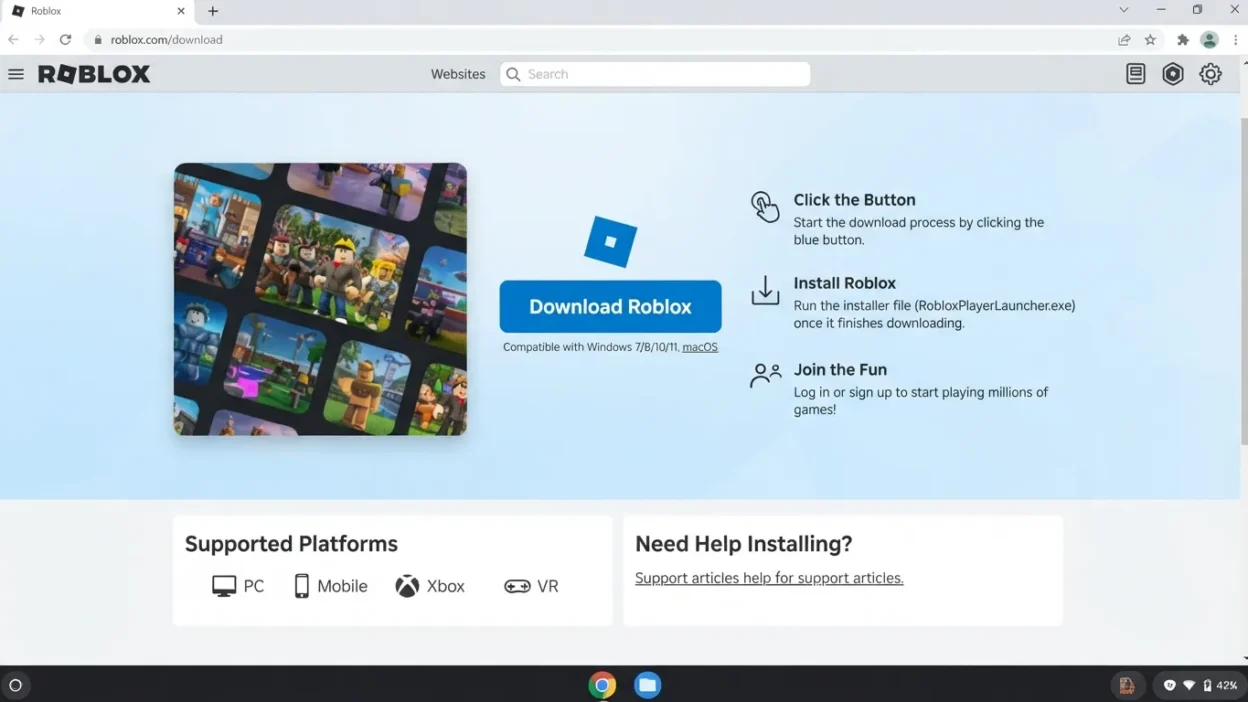
The official download page is available at Roblox Download.
For computer users, Roblox’s installation process can also begin when you open an experience and click Play. Roblox’s support documentation explains that the site can install Roblox Player when it is not already installed.
This is important because you do not need to search for a random “Roblox installer” on a third-party website. Using Roblox’s official website or your device’s official app store is the safer approach.
How to Download Roblox from Roblox.com
The exact process depends on your device, but downloading Roblox on a computer is straightforward.
Install Roblox on Windows
Windows users have two common official options.
Option 1: Roblox website
- Open Chrome, Microsoft Edge, or Firefox.
- Visit Roblox.com.
- Sign in to your Roblox account or create an account.
- Open any Roblox experience.
- Click Play.
- If Roblox is not installed, follow the installation prompt.
- Open the downloaded installer and allow it to complete.
- Return to the experience and select Play again if necessary.
Roblox officially supports 64-bit versions of Windows 10 and Windows 11. Its listed computer requirements also include DirectX 10 or higher feature-level support and at least 300 MB of available storage for installation.
Option 2: Microsoft Store
Windows users can also install the newer Roblox application through the Microsoft Store. Roblox says the newer app is named “Roblox – Windows” and has a blue icon, while the older Store version is simply named “Roblox.”
If you already have the older version, check the Microsoft Store listing carefully before installing the newer application.
Install Roblox on Mac
Mac users can also install Roblox through Roblox.com.
- Open Safari, Chrome, or Firefox.
- Go to Roblox.com.
- Sign in to your account.
- Select a Roblox experience.
- Click Play.
- Follow the prompt to download Roblox.
- Open the downloaded installer.
- Complete the installation.
- Return to Roblox and click Play to launch the experience.
Roblox currently lists macOS 10.13 High Sierra and newer as supported for Roblox on Mac.
If you have trouble launching Roblox after installation, Roblox recommends reinstalling the software when normal troubleshooting does not resolve the problem.
How to Download Roblox on Mobile
You normally should not download a separate Roblox installer file on a phone.
Instead, use your device’s official application store.
iPhone and iPad
For Apple devices:
- Open the App Store.
- Search for Roblox.
- Select the official Roblox application.
- Tap Get.
- Complete Apple’s authentication process if requested.
- Wait for the app to install.
- Open Roblox and sign in.
Roblox currently requires iOS 14 or iPadOS 14 or later. Its support documentation lists compatible minimum device generations as well.
Android Phones and Tablets
For Android:
- Open the Google Play Store.
- Search for Roblox.
- Select the official Roblox app.
- Tap Install.
- Wait for installation to finish.
- Open Roblox.
- Sign in or create an account.
Roblox currently requires Android 8.0 or later, and compatible Android devices need OpenGL ES 3.0 support.
Avoid downloading an APK from an unrelated website when the official app is available through Google Play. An unofficial package may be outdated, modified, or unsafe.
Amazon Fire Tablets
Roblox also supports selected Amazon Fire tablets. Roblox’s current requirements page lists devices including the Fire 7 (9th generation), Fire HD 8 (8th generation), Fire HD 10 (9th generation), and Fire Max 11 (13th generation).
Roblox System Requirements
Before downloading Roblox, make sure your device meets the basic requirements.
| Device | Current requirement |
| Windows PC | 64-bit Windows 10 or Windows 11 |
| Mac | macOS 10.13 High Sierra or newer |
| iPhone/iPad | iOS/iPadOS 14 or newer |
| Android | Android 8.0 or newer + OpenGL ES 3.0 |
| Linux | Not officially supported |
Roblox also recommends at least 1 GB of memory on Windows and approximately 300 MB of available storage for installation. For a single-use household, Roblox lists a minimum internet connection of about 4–8 Mbps.
Keep in mind that meeting the minimum requirements does not guarantee that every Roblox experience will run at the same performance level. More demanding experiences can place greater demands on your hardware.
Roblox Player vs. Roblox Studio
One common source of confusion is the difference between Roblox Player and Roblox Studio.
Roblox Player is what ordinary players use to launch and play Roblox experiences. You do not need Roblox Studio simply to play games.
Roblox Studio is the creation application used to build and edit Roblox experiences. Roblox provides Studio for Windows and Mac, and its current Studio documentation lists separate system requirements.
So, if your goal is simply to play Roblox, look for the normal Roblox installation rather than downloading Studio.
If you want to create your own experiences, Studio is the appropriate application.
Is Roblox Com Download Safe?
The safest approach is to download Roblox directly from Roblox.com or an official app store supported by your device.
Be cautious with websites offering:
- Modified Roblox applications
- Unofficial Roblox installers
- Random APK files
- “Free Robux” downloads
- Cracked versions of Roblox
- Programs claiming to unlock paid features
Roblox itself warns users that there is no legitimate secret method for getting free Robux and advises users not to trust people or websites making such claims.
Before installing anything, check the website address and make sure you are using an official source.
Roblox Download Problems and Quick Fixes
Sometimes Roblox may download successfully but fail to install or launch.
Roblox Will Not Install
First, check that your operating system meets Roblox’s requirements. On Windows, make sure you are using a supported 64-bit version of Windows. On Mac, check your macOS version.
You can also:
- Restart your device.
- Close Roblox and your browser.
- Try the installation again.
- Check available storage.
- Temporarily check whether security software is blocking the installation.
- Reinstall Roblox if the installation appears corrupted.
Roblox’s support documentation specifically recommends reinstalling the software as one troubleshooting method for installation problems.
Roblox Will Not Launch
If Roblox installs but will not open, restart your computer and try launching an experience again.
On Windows, Roblox notes that antivirus or firewall software can sometimes interfere with required files or connections. Outdated system components can also contribute to launch problems.
If the issue continues, reinstalling Roblox can replace damaged installation files.
Reinstalling Roblox
A clean reinstall can help when the existing installation is corrupted.
On Windows, Roblox provides specific uninstall and reinstall instructions. On Mac, Roblox also recommends reinstalling through the website when necessary.
After reinstalling, sign in with the same Roblox account you normally use.
FAQs:
Is Roblox free to download?
Yes. The Roblox application itself can be downloaded through official Roblox and supported app-store channels without buying the basic application. Individual experiences may have optional purchases or paid features, so downloading Roblox should not be confused with every item or experience inside the platform being free.
Is Roblox.com the official Roblox website?
Yes. Roblox.com is the official Roblox website. Its download page provides information and download options for supported devices.
Can I download Roblox without Roblox Studio?
Yes. Roblox Studio is intended for creating experiences. You do not need Studio just to play Roblox experiences.
Can I download Roblox on an older PC?
It depends on the operating system and hardware. Roblox currently lists 64-bit Windows 10 and Windows 11 for PC, while Linux is not officially supported. Hardware such as graphics support, memory, and available storage can also affect compatibility.
Should I download Roblox APK files from other websites?
It is better to use the official Google Play Store on Android rather than downloading an APK from an unrelated website. The official store provides the normal distribution channel for the Roblox application and reduces the need to rely on unknown installers.
Conclusion:
If you searched “roblox com download,” the simplest solution is to use the official Roblox website or your device’s official app store.
Windows and Mac users can begin installation through Roblox.com, while mobile users can install the official Roblox app through their platform’s store.
For Windows, you can also use the newer Roblox – Windows Microsoft Store application. And if your goal is to create Roblox experiences rather than play them, Roblox Studio is a separate tool designed for creators.
Most importantly, avoid unofficial installers, modified applications, and suspicious “free Robux” downloads. Starting with an official source gives you the clearest and safest installation path.

I am Haruki Murakami, a creative mind behind Punsarena.com, where words turn into wit and humor meets meaning.
I am passionate about crafting clever puns, playful phrases, and trending wordplay that entertains and inspires.
I am here to make language fun, engaging, and unforgettable—one pun at a time.